Python Function Blocks
Python function blocks let you write automation logic in Python while integrating seamlessly with your IEC 61131-3 program. You get access to Python's rich standard library for tasks like math, string processing, data conversion, and more. All within the Autonomy Edge platform.
Why Python Function Blocks?
Standard IEC 61131-3 languages are built for deterministic, cyclic control logic. They're great at reading sensors, driving outputs, and executing tightly timed sequences. But some tasks are easier in a general-purpose language:
- Complex calculations: Statistical analysis, advanced math, or data transformations
- String processing: Parsing messages, formatting data, or building protocol payloads
- Data conversion: Converting between units, encoding/decoding values, or mapping ranges
- Algorithm prototyping: Quickly testing ideas with Python's expressive syntax before deciding whether to reimplement in ST
Python function blocks handle these tasks without leaving the Autonomy Edge platform.
How Python FBs Fit In
Python function blocks run differently from standard IEC function blocks. Here's how they compare:
| Aspect | Standard IEC Function Block | Python Function Block |
|---|---|---|
| Execution | Runs inside the PLC scan cycle | Runs as a separate process |
| Timing | Synchronized with the scan cycle | Asynchronous, ~100 ms loop |
| State | Managed by the runtime | Managed by the Python process |
| Language | ST, LD, FBD, IL | Python 3 |
| Libraries | IEC standard functions only | Python standard library |
The key point: Python function blocks are not synchronized with the PLC scan cycle. Your block exchanges input and output values with the PLC on a ~100 ms cadence, independently of the PLC scan. You write your logic in block_init() and block_loop() and reference variables by name.
When to Use Python vs. IEC Languages
Use Python function blocks when:
- You need complex math that would be verbose in Structured Text (e.g., moving averages, statistical calculations)
- You want to process or format strings beyond what IEC string functions offer
- You need to work with data structures like lists or dictionaries
- You're prototyping logic quickly and Python's syntax helps you iterate faster
Use standard IEC languages when:
- You need deterministic, scan-cycle-synchronized execution
- You're implementing time-critical control logic (motor control, safety interlocks)
- You want guaranteed execution timing for real-time responsiveness
- Your logic is naturally expressed as relay logic (LD) or block connections (FBD)
Tip: Python function blocks are only available as Function Blocks, not as Programs or Functions. When creating a new POU and choosing Python as the language, the POU type is always Function Block.
Creating a Python Function Block
To create a Python function block in the Autonomy Edge IDE:
- In the left panel, click the blue + button.
- Hover over Function Block in the menu that appears.
- In the dialog that opens, enter a name for your block (e.g.,
my_python_block). Names must follow CamelCase, PascalCase, or snake_case. - Select Python from the Language dropdown.
- Click Create.
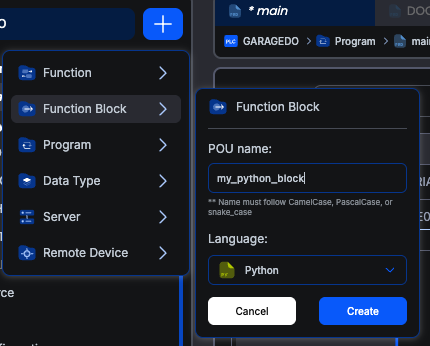
The IDE opens a code editor pre-populated with the Python function block template.
The Template Code
Every new Python function block starts with this template:
pythonfrom multiprocessing import shared_memory
import struct
import time
import os

def block_init():
    print('Block was initialized')

def block_loop():
    print('Block has run the loop function')
This template defines the two required functions:
block_init(): Called exactly once when the Python process starts. Use it for one-time setup, such as initializing persistent variables or preparing data structures.block_loop(): Called repeatedly, approximately every 100 milliseconds. This is where your main logic goes. Reading inputs, performing calculations, and writing outputs.
Note: Keep the four
importstatements at the top of the template. They're required. Add your own imports below them.
A Basic Example
Here's a simple Python function block that scales an analog input value from a raw integer range to engineering units. Suppose you declare the following variables in the Variables Table:
| Name | Type | Class |
|---|---|---|
raw_value | INT | Input |
scale_min | REAL | Input |
scale_max | REAL | Input |
scaled_output | REAL | Output |
The Python code uses those names directly:
pythonfrom multiprocessing import shared_memory
import struct
import time
import os

def block_init():
    # No special initialization needed for this example
    pass

def block_loop():
    global scaled_output

    # Scale raw_value into engineering units (assuming raw range 0-32767)
    if scale_max != scale_min:
        scaled_output = scale_min + (raw_value / 32767.0) * (scale_max - scale_min)
    else:
        scaled_output = scale_min
A few notes on the example:
raw_value,scale_min, andscale_maxare inputs. Read them by name with their current value at the start of each cycle.scaled_outputis an output. Assign it to send the new value back to the PLC.- The
global scaled_outputline is a Python rule, not a block-specific one: in Python, you needglobalwhenever you assign to a module-level variable from inside a function. Reads don't need it.
The pattern is the same as a C++ function block: declare inputs and outputs in the Variables Table, then use them by name in your code.
What's Next?
Continue to Python Function Block Structure for a closer look at block_init() / block_loop(), the supported variable types, and a complete worked example.
On This Page