C++ Function Blocks
C++ function blocks let you write native C/C++ code that executes directly within the PLC scan cycle. Unlike Python function blocks. Which run asynchronously in a separate process. C++ code runs synchronously inside the runtime, giving you deterministic timing and direct hardware access. This makes C++ the ideal choice when performance, precision, or low-level hardware control matters.
Why Use C++ Function Blocks?
The standard IEC 61131-3 languages (ST, LD, FBD, IL) cover most automation tasks. However, some scenarios call for native C/C++ code:
- Hardware access: Directly control GPIO pins, serial ports, I2C/SPI buses, and other peripherals that standard IEC languages cannot reach.
- Performance-critical logic: Implement tight control loops, signal processing, or real-time algorithms that need the speed of compiled native code.
- Arduino integration: When deploying to Arduino-compatible hardware, you get full access to the Arduino API (
pinMode,digitalWrite,Serial,Wire,SPI,EEPROM, and more). - Existing C/C++ libraries: Reuse code from the vast C/C++ ecosystem, including math libraries, communication protocols, and sensor drivers.
- Complex algorithms: Implement PID variants, Kalman filters, FFT, or any algorithm that benefits from the full C++ standard library.
C++ vs Python vs IEC Languages
| Feature | IEC Languages (ST, LD, etc.) | C++ Function Blocks | Python Function Blocks |
|---|---|---|---|
| Execution model | Synchronous (scan cycle) | Synchronous (scan cycle) | Asynchronous (separate process) |
| Timing | Deterministic | Deterministic | Non-deterministic |
| Hardware access | Via I/O addressing only | Full native access | Via shared memory |
| Performance | Compiled IEC code | Compiled native code | Interpreted |
| Arduino API | Not available | Full access | Not available |
| Standard library | IEC standard functions | Full C++ stdlib | Full Python stdlib |
| POU types | Program, Function, FB | Function Block only | Function Block only |
| Best for | General PLC logic | Hardware, performance | Data processing, scripting |
The key distinction: C++ code runs inside the scan cycle, just like native IEC code. When the PLC runtime executes a scan, your C++ function block's loop() function is called as part of that scan. It completes before the scan moves on.
Creating a C++ Function Block
To create a C++ function block in the Autonomy Edge IDE:
- In the left panel, click the blue + button.
- Hover over Function Block in the menu that appears.
- In the dialog that opens, enter a name for your block (e.g.,
MotorDriver). Names must follow CamelCase, PascalCase, or snake_case. - Select C++ from the Language dropdown.
- Click Create.
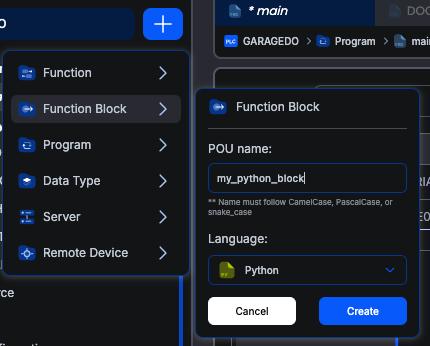
The IDE creates a new function block with a C++ code editor and a Variables Table, pre-populated with a template.
The C++ Template
When you create a new C++ function block, the IDE provides this starting template:
cppvoid setup() {
    // Runs once on the first scan cycle
}

void loop() {
    // Runs on every scan cycle
}
These two functions are the foundation of every C++ function block:
setup(): Called exactly once, on the first scan cycle after the PLC starts running. Use it for one-time initialization: configuring hardware pins, setting initial values, or allocating resources.loop(): Called on every subsequent scan cycle. This is where your main logic lives: reading sensors, computing outputs, updating state machines, and writing to actuators.
The IDE validates that both functions exist in your code. If either setup() or loop() is missing, you'll get a validation error when building.
Working with Variables
C++ function blocks declare their inputs and outputs in the Variables Table. That's the block's interface to the rest of the PLC program. For each variable you specify a name, a class (Input or Output), and an IEC data type, and the variable becomes directly accessible by that name in your C++ code.
Local state. Counters, accumulators, helper structures. Is not declared in the Variables Table. Just declare it in your C++ code like any normal C++ variable: at file scope (above setup() / loop()) for state that needs to persist between scans, or at function scope for scratch values inside a single call.
For example, if you declare these variables:
| Name | Class | Type |
|---|---|---|
| ENABLE | Input | BOOL |
| SPEED | Input | INT |
| MOTOR_ON | Output | BOOL |
| ERROR_CODE | Output | INT |
You can use them directly in your C++ code as if they were regular variables:
cppvoid setup() {
    MOTOR_ON = 0;
    ERROR_CODE = 0;
}

void loop() {
    if (ENABLE) {
        if (SPEED > 0 && SPEED <= 100) {
            MOTOR_ON = 1;
            ERROR_CODE = 0;
        } else {
            MOTOR_ON = 0;
            ERROR_CODE = 1; // Speed out of range
        }
    } else {
        MOTOR_ON = 0;
    }
}
Use the names from the Variables Table directly in your code.
A Complete Example
Here's a practical example: a C++ function block that implements a simple moving average filter.
Variables Table:
| Name | Class | Type | Description |
|---|---|---|---|
| INPUT_VALUE | Input | REAL | Raw sensor reading |
| WINDOW_SIZE | Input | INT | Number of samples to average |
| FILTERED | Output | REAL | Filtered output value |
C++ Code:
cpp#define MAX_WINDOW 20

float buffer[MAX_WINDOW];
int index = 0;
int count = 0;

void setup() {
    for (int i = 0; i < MAX_WINDOW; i++) {
        buffer[i] = 0.0f;
    }
    index = 0;
    count = 0;
    FILTERED = 0.0;
}

void loop() {
    int size = WINDOW_SIZE;
    if (size < 1) size = 1;
    if (size > MAX_WINDOW) size = MAX_WINDOW;

    buffer[index] = INPUT_VALUE;
    index = (index + 1) % size;
    if (count < size) count++;

    float sum = 0.0f;
    for (int i = 0; i < count; i++) {
        sum += buffer[i];
    }
    FILTERED = sum / (float)count;
}
Variables declared outside setup() and loop() (like buffer, index, and count) retain their values between scan cycles, just like static variables.
Tips for Getting Started
- Start simple: Begin with a basic function block that reads one input and writes one output. Verify it works before adding complexity.
- Use the Variables Table for inputs and outputs only: interface variables (Input, Output) belong in the Variables Table so the rest of the PLC program can connect to them. Internal state is just regular C++ variables in your code; don't try to put it in the Variables Table.
- Keep loop() fast: Remember that
loop()runs every scan cycle. Avoid blocking operations (long delays, busy-wait loops) that would stall the PLC. - Test incrementally: Build and test your project frequently. The IDE reports build errors with line numbers to help you debug.
- Check data types: C++ function block variables use IEC type definitions (e.g.,
IEC_BOOLisuint8_t,IEC_INTisint16_t). Be mindful of type sizes, especially when doing arithmetic.
What's Next?
Learn the IEC↔C type mappings and how to write portable code with #ifdef ARDUINO: C++ Function Block Structure.
On This Page