Tasks & Instances
Writing PLC logic is only half the picture. The other half is defining when and how that logic executes. You do this through tasks and instances, which are configured in the Resource section of your project.
This page explains the concepts. For hands-on instructions on configuring them in the IDE, see the Task Configuration section.
The Execution Model
IEC 61131-3 defines a hierarchical execution model:
- Configuration: The top-level element representing the entire PLC system.
- Resource: A processing unit within the configuration. In the Autonomy Edge IDE, there is one resource per project.
- Tasks: Defined within a resource. Each task specifies a scheduling policy (when to execute) and a priority.
- Instances: Bind programs to tasks. An instance says: "Run this program under that task."
When the PLC runtime starts, it reads the resource configuration, creates the defined tasks, and begins executing the assigned programs according to each task's schedule.
Tasks
A task is a scheduling unit that controls how often (or under what conditions) its assigned programs execute. Each task has three properties:
Triggering Mode
The triggering mode determines what causes the task to execute:
- Cyclic: The task runs repeatedly at a fixed time interval. This is the most common mode for PLC control loops. For example, a task with a 20ms interval executes its programs every 20 milliseconds.
- Interrupt: The task runs in response to an event. This mode is used for event-driven processing.
Most PLC applications use cyclic tasks. The cycle time determines how quickly the system responds to changes. A faster cycle time means more responsive control, but also more CPU load.
Interval
The interval specifies the timing for the task:
-
For Cyclic tasks: The time between executions, specified in IEC 61131-3 time literal format:
T#20ms: 20 millisecondsT#100ms: 100 millisecondsT#1s: 1 secondT#500us: 500 microseconds
-
For Interrupt tasks: The event condition or source name.
Choosing the right interval depends on your application:
| Use Case | Recommended Interval |
|---|---|
| Fast control loops (motor drives, high-speed counters) | 1–10 ms |
| Standard process control (temperature, pressure, flow) | 10–100 ms |
| Slow monitoring (logging, HMI updates) | 100 ms–1 s |
Priority
An integer from 0 to 100 that determines task execution order when multiple tasks need to run at the same time. Lower numbers = higher priority. Priority 0 is the highest; priority 100 is the lowest.
If two tasks are scheduled to execute at the same instant, the runtime runs the higher-priority task first. For most projects with a single task, just leave priority at 0.
Instances
An instance is the binding between a program and a task. It answers: "Which program should this task run?"
Each instance has three properties:
- Name: A unique identifier for this instance (e.g.,
MainInstance,MotorControlInstance). - Task: The name of the task this instance belongs to. Must match one of the defined tasks.
- Program: The name of the program POU to execute. Must be a POU of type
programdefined in your project.
A single task can have multiple instances, meaning it runs multiple programs in sequence during each cycle. You could also have different tasks running different programs at different rates. A fast loop for motor control and a slow loop for logging, for example.
Why "Instances" Instead of Direct Assignment?
The instance concept might seem like an extra layer, but it serves important purposes:
- Multiple programs per task: A single task can execute several programs in sequence.
- Same program, different tasks: You could run the same program under different tasks (though this is uncommon).
- Flexibility: The program definition is separate from its execution schedule. You can change timing without touching the program code.
A Typical Configuration
Here's what a typical resource configuration looks like for a simple project:
Task:
- Name:
MainTask - Triggering:
Cyclic - Interval:
T#20ms - Priority:
0
Instance:
- Name:
MainInstance - Task:
MainTask - Program:
MyProgram
This configuration means: "Every 20 milliseconds, execute the program MyProgram."
For a more complex project, you might have:
Tasks:
| Name | Triggering | Interval | Priority |
|---|---|---|---|
| FastLoop | Cyclic | T#10ms | 0 |
| SlowLoop | Cyclic | T#500ms | 1 |
Instances:
| Name | Task | Program |
|---|---|---|
| MotorControl | FastLoop | MotorProgram |
| SafetyCheck | FastLoop | SafetyProgram |
| DataLogger | SlowLoop | LoggingProgram |
This runs MotorProgram and SafetyProgram every 10ms (fast loop), and LoggingProgram every 500ms (slow loop).
Global Variables
The Resource configuration also includes Global Variables: variables that are shared across all POUs in the project. Any POU can access a global variable by declaring an external variable with the same name.
Global variables are useful for:
- Shared data: A setpoint that multiple programs need to read.
- Inter-POU communication: One program writes a flag, another reads it.
- System parameters: Configuration values that should be accessible everywhere.
Global variables are managed in the Global Variables table at the top of the Resource editor.
Where to Configure
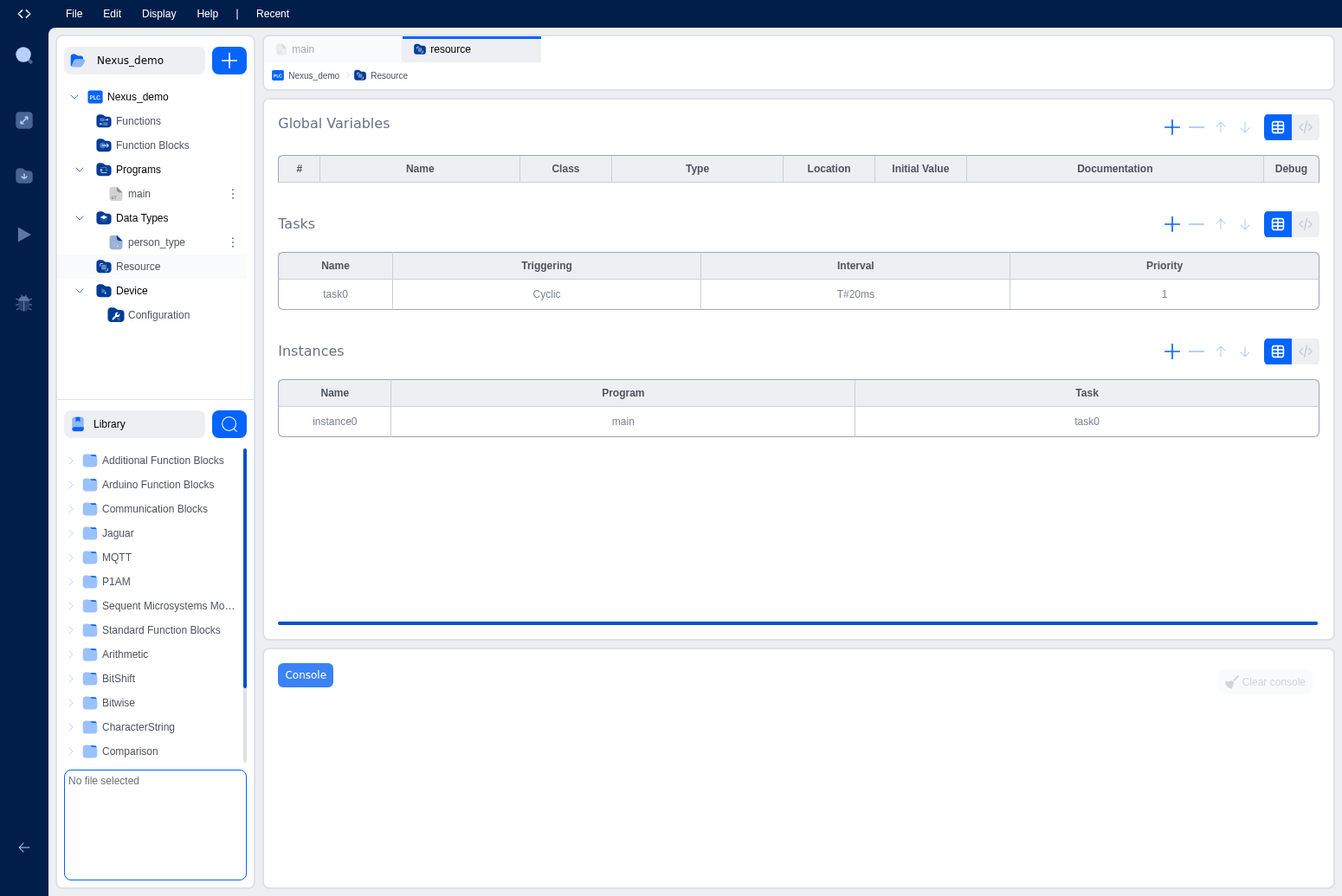
All of this. Tasks, instances, and global variables. Is configured in the Resource editor. Open it by clicking Resources in the Project Explorer. The Resource editor has three sections stacked vertically:
- Global Variables table
- Tasks table
- Instances table
Each section supports both a visual table view and a text/code view. You can switch between them using the table/code toggle buttons.
Tip: For most projects, start with a single task at
T#20msand a single instance pointing to your main program. Add more tasks only when you genuinely need different execution rates.
What's Next?
Get hands-on with task configuration in the IDE: Understanding Tasks.
On This Page