Program Organization Units (POUs)
Program Organization Units. Commonly called POUs. Are the building blocks of any IEC 61131-3 PLC program. A POU is a self-contained unit of code with its own variables and logic. The standard defines three types: Programs, Functions, and Function Blocks. Understanding the differences between them is key to writing well-structured projects.
The Three POU Types
Program
A Program is the top-level POU that serves as the entry point for execution. This is where your main control logic lives. Programs are the POUs that get assigned to tasks: a task calls a program on a periodic or event-driven schedule.
Key characteristics:
- Stateful: A program retains its variable values between execution cycles. When a task triggers a program, its variables still hold the values from the previous cycle.
- Single instance: You don't instantiate a program like a function block. Instead, you create an instance in the Resource configuration that binds the program to a task.
- Direct I/O access: Programs can declare variables with I/O locations (e.g.,
%IX0.0,%QW2) to directly read physical inputs and write physical outputs. - Languages: Programs can be written in Structured Text (ST), Ladder Diagram (LD), Function Block Diagram (FBD), or Instruction List (IL).
Use a Program when you need a top-level routine that runs on a schedule and interacts with the PLC's I/O.
Function
A Function is a POU that computes and returns a single value. Functions are purely computational. They take inputs, process them, and produce an output.
Key characteristics:
- Stateless: Functions don't retain any data between calls. Every time you call a function, it starts fresh with only the input values you provide. Local variables are re-initialized on each call.
- Return value: Every function has a return type. When you create a function, you specify its return type (e.g., BOOL, INT, REAL, or a user-defined type). The function's name acts as the return variable. Assigning a value to the function name inside its body sets the return value.
- No instances: Functions are called directly by name, not instantiated.
- Languages: Functions support ST, LD, FBD, and IL.
Use a Function when you need a reusable calculation. Converting units, computing a checksum, applying a formula, or any operation that depends only on its inputs.
Example: A function CELSIUS_TO_FAHRENHEIT with an input TEMP_C : REAL and return type REAL:
codeCELSIUS_TO_FAHRENHEIT := TEMP_C * 9.0 / 5.0 + 32.0;
Function Block
A Function Block is a reusable POU that maintains internal state. Function blocks are the workhorses of IEC 61131-3. They combine the reusability of functions with the statefulness of programs.
Key characteristics:
- Stateful: A function block retains its variable values between calls. This makes it suitable for logic that needs memory: timers, counters, state machines, PID controllers, etc.
- Instantiable: Function blocks must be instantiated before use. You create an instance as a variable in a program or another function block. Each instance has its own independent copy of all local variables.
- Input/Output interface: Function blocks communicate through input, output, and in/out variables. The caller sets inputs, calls the function block, and then reads outputs.
- Extended language support: In addition to the five standard languages, the IDE supports function blocks written in Python and C/C++.
- No return value: Unlike functions, function blocks don't return a single value. Instead, they expose output variables.
Use a Function Block when you need reusable logic with memory. Timers (TON, TOF), counters (CTU, CTD), PID loops, motor control sequences, communication handlers, or any stateful algorithm.
Example: A function block MOTOR_CONTROL with inputs START : BOOL, STOP : BOOL, and outputs RUNNING : BOOL, FAULT : BOOL. Each motor in your plant gets its own instance:
codeMotor1 : MOTOR_CONTROL;
Motor2 : MOTOR_CONTROL;
Creating POUs in the IDE
To create a new POU:
- Click the + button next to the project name in the Project Explorer.
- Enter a name for the POU.
- Select the POU type: Program, Function, or Function Block.
- Select the programming language.
- For Programs: ST, LD, FBD, or IL.
- For Functions: ST, LD, FBD, or IL.
- For Function Blocks: ST, LD, FBD, IL, Python, or C/C++.
- If creating a Function, specify the return type (e.g., BOOL, INT, REAL).
- Click Create.
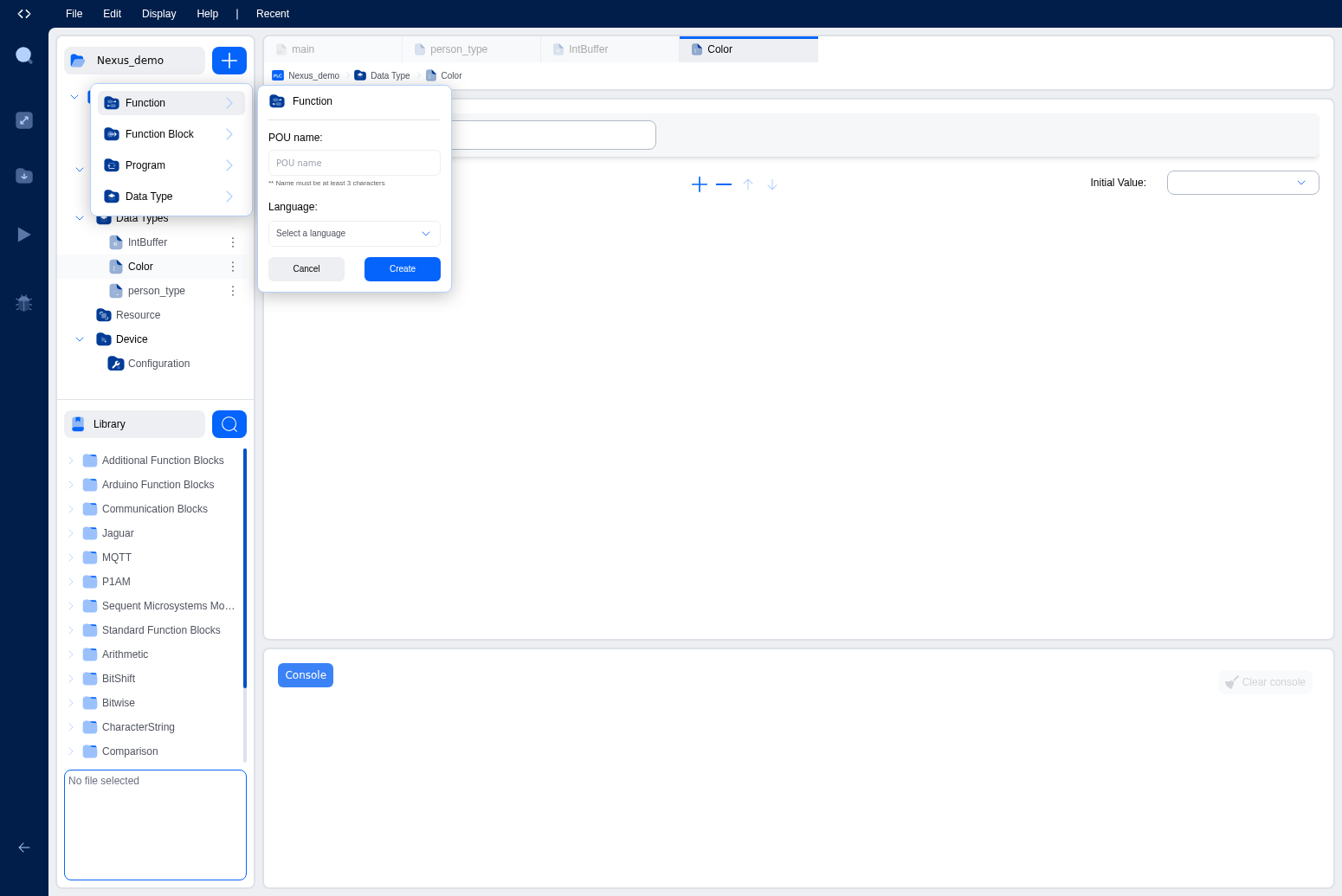
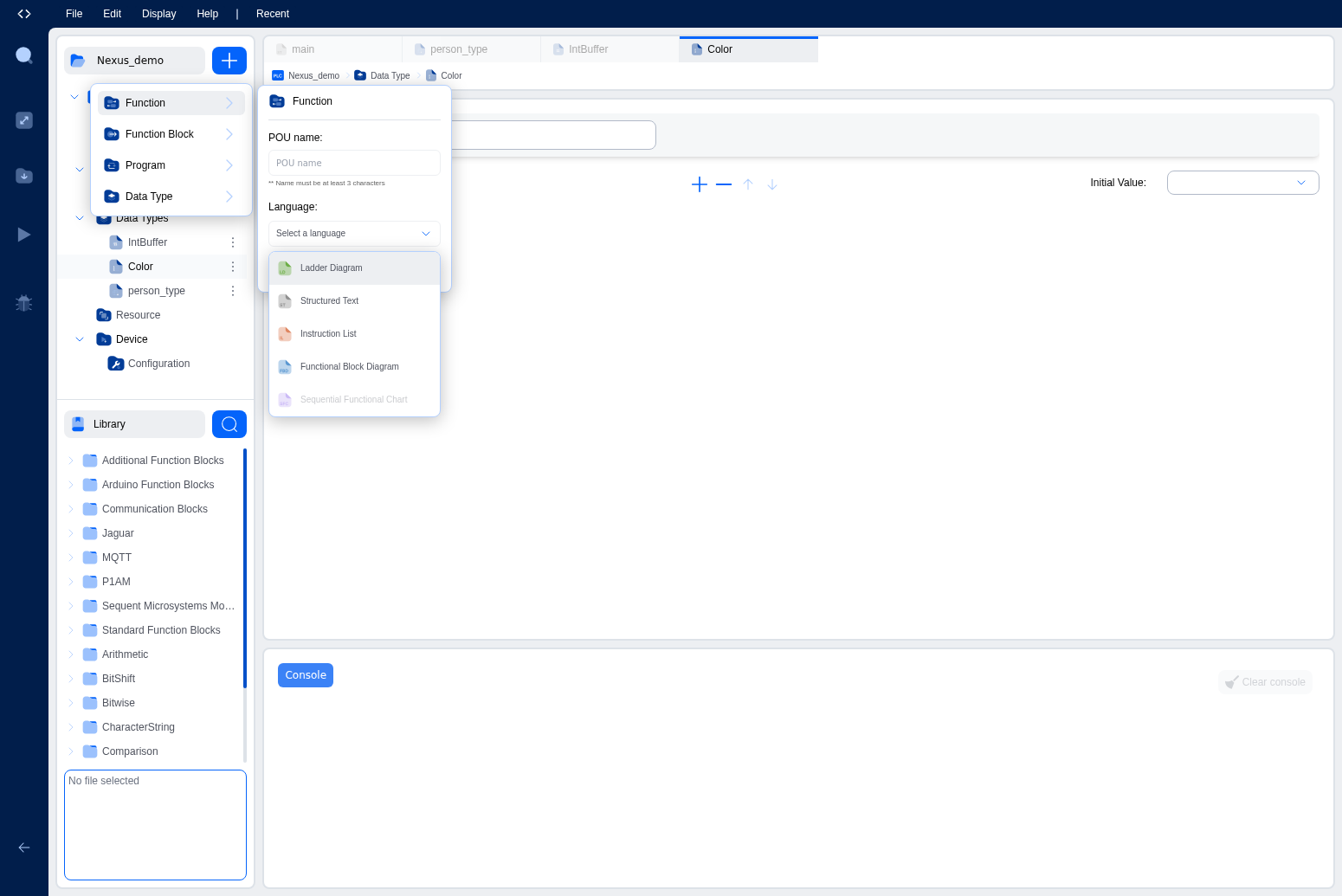
The new POU appears in the Project Explorer tree under Functions, Function Blocks, or Programs. Click it to open its editor.
Editing a POU
When you open a POU, the editor shows two sections:
-
Variables Table (top): Lists all variables declared for this POU. You can add, remove, and edit variables here. Each variable has a name, class (input, output, local, etc.), type, location, initial value, and documentation field. The table is collapsible and resizable.
-
Code/Graphical Editor (bottom): Where you write the POU's logic.
- For textual languages (ST, IL, Python, C++): A code editor with syntax highlighting.
- For graphical languages (LD, FBD): A visual canvas where you place and connect elements.
POU Naming Rules
POU names must be valid IEC 61131-3 identifiers:
- Start with a letter or underscore.
- Contain only letters, digits, and underscores.
- Cannot conflict with reserved words or existing POU names in the project.
The IDE validates names when you create or rename a POU.
How POUs Work Together
In a typical project:
- You define Functions for reusable calculations (e.g., unit conversions, setpoint calculations).
- You define Function Blocks for reusable stateful logic (e.g., PID controllers, motor sequences, timers).
- You define Programs as top-level entry points. Inside a program, you call functions directly and declare instances of function blocks.
- In the Resource configuration, you create tasks and bind programs to those tasks through instances.
This layered approach keeps your code modular, reusable, and organized.
Standard Library
The IDE provides access to a library of standard IEC 61131-3 function blocks. You can browse these in the Library panel of the explorer. Standard FBs include:
- Timers: TON (on-delay), TOF (off-delay), TP (pulse)
- Counters: CTU (count up), CTD (count down), CTUD (count up/down)
- Bistable: SR (set-dominant), RS (reset-dominant)
- Edge detection: R_TRIG (rising edge), F_TRIG (falling edge)
- Type conversions: Various type conversion functions
These are available in any POU without needing to define them yourself.
Tip: Start with Programs for your main logic, and extract reusable pieces into Functions and Function Blocks as your project grows. Don't try to design the perfect POU hierarchy upfront.
What's Next?
Learn about the variable system and data types that POUs use: Variables & Data Types.
On This Page