ST Programming Examples
This section provides practical examples of common Structured Text programming patterns. Each example demonstrates how to apply ST language features to solve real-world control problems.
Getting Started Examples
These short examples introduce the most common ST control flow patterns. Each one is self-contained. Declare the variables, paste the code into a Program POU, and run it.
Example 1: Simple Temperature Control (IF/THEN/ELSE)
A basic thermostat: turn a fan on when the temperature exceeds a threshold, turn it off otherwise.
Variables:
| Name | Class | Type | Initial Value | Description |
|---|---|---|---|---|
temp | Local | REAL | 20.0 | Current temperature reading |
fan | Local | BOOL | FALSE | Fan output |
Code:
codeIF temp > 25.0 THEN
    fan := TRUE;
ELSE
    fan := FALSE;
END_IF;
This is the simplest form of conditional logic in ST. The IF block evaluates the condition each scan cycle and sets the output accordingly.
Example 2: FOR Loop: Counting a Sum
Use a FOR loop to add up numbers from 1 to 10.
Variables:
| Name | Class | Type | Initial Value | Description |
|---|---|---|---|---|
i | Local | INT | 0 | Loop counter |
sum | Local | INT | 0 | Accumulated sum |
Code:
codesum := 0;
FOR i := 1 TO 10 BY 1 DO
    sum := sum + i;
END_FOR;
After execution, sum equals 55 (1+2+3+...+10). The BY 1 clause is the step size. You can change it to skip values (e.g., BY 2 counts 1, 3, 5, ...).
Example 3: WHILE Loop with Condition
Use a WHILE loop that runs as long as two conditions are true.
Variables:
| Name | Class | Type | Initial Value | Description |
|---|---|---|---|---|
running | Local | BOOL | TRUE | Loop enable flag |
count | Local | INT | 0 | Loop counter |
Code:
codeWHILE running AND count < 100 DO
    count := count + 1;
END_WHILE;
The loop increments count until it reaches 100 or running becomes FALSE. WHILE loops check the condition before each iteration. If the condition is already false, the body never executes.
Caution: Be careful with WHILE loops in PLC programs. If the exit condition is never met, the loop will block the scan cycle. Prefer FOR loops when the number of iterations is known.
Temperature Control System
This example shows a complete temperature control program that uses conditional logic, timers, and alarm handling. The program controls heating and cooling based on temperature readings with a safety delay before activating the heater.
Variables Definition
Define these variables in the Variables Table:
| Name | Class | Type | Description |
|---|---|---|---|
sensor_temp | Local | REAL | Current temperature reading from sensor |
setpoint | Local | REAL | Desired target temperature |
enable | Local | BOOL | Enable/disable the control system |
heater_on | Local | BOOL | Heater control output |
cooler_on | Local | BOOL | Cooler control output |
alarm | Local | BOOL | Out-of-range alarm flag |
temp_error | Local | REAL | Temperature error (setpoint - actual) |
timer | Local | TON | Timer for heater activation delay |
Complete Code
codeIF enable THEN
    temp_error := setpoint - sensor_temp;

    (* Start heater only after 5s of continuous heat demand *)
    timer(IN := (temp_error > 2.0), PT := T#5s);

    IF timer.Q THEN
        heater_on := TRUE;
        cooler_on := FALSE;
    ELSIF temp_error < -2.0 THEN
        heater_on := FALSE;
        cooler_on := TRUE;
    ELSE
        heater_on := FALSE;
        cooler_on := FALSE;
    END_IF;

    (* Out-of-range alarm *)
    IF (sensor_temp > 50.0) OR (sensor_temp < 0.0) THEN
        alarm := TRUE;
    ELSE
        alarm := FALSE;
    END_IF;
ELSE
    heater_on := FALSE;
    cooler_on := FALSE;
    alarm := FALSE;
    counter := 0;
    timer(IN := FALSE, PT := T#5s);
END_IF;
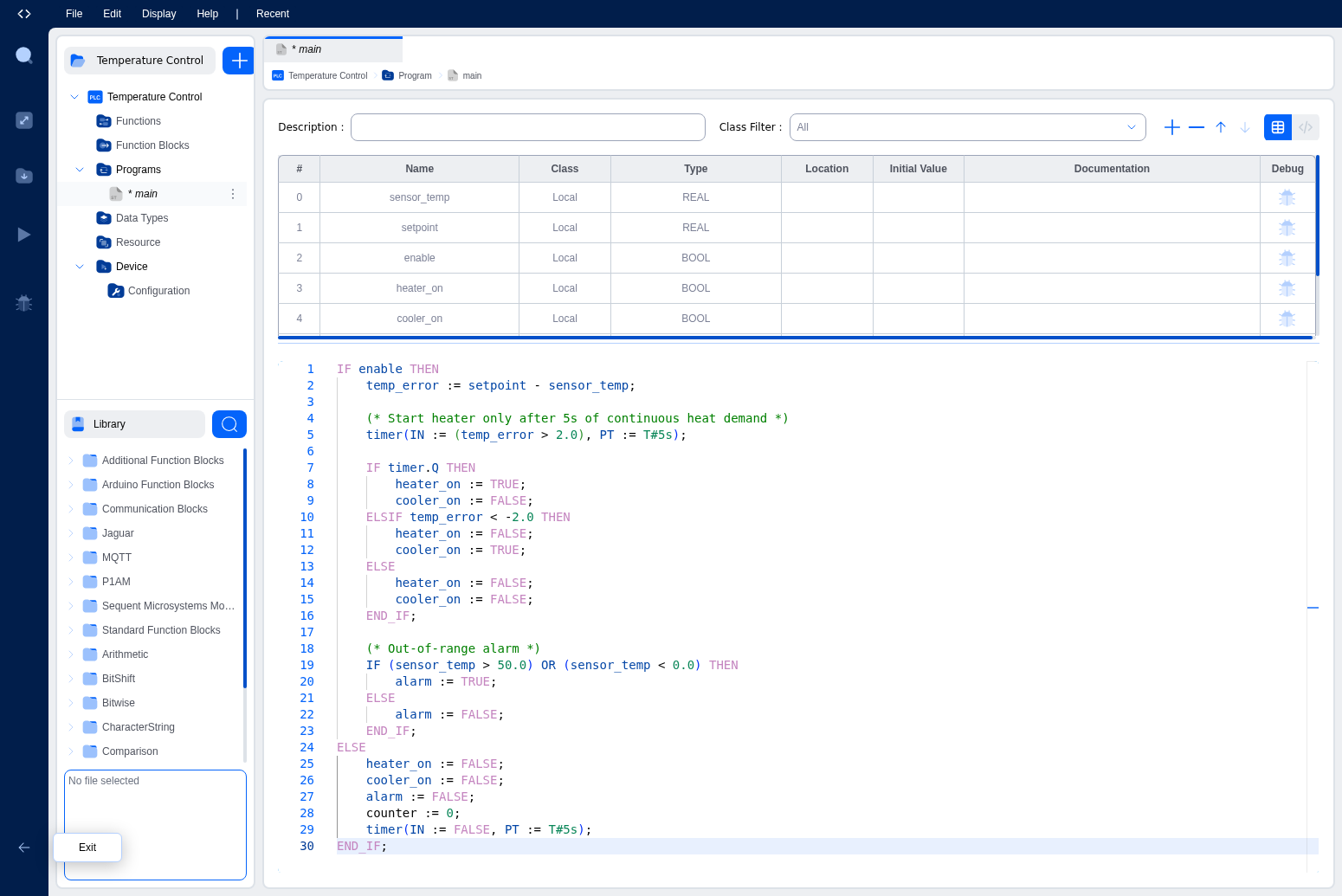
Code Explanation
Enable Logic: The outer IF statement checks whether the system is enabled. When disabled, all outputs are turned off and the timer is reset.
Temperature Error Calculation: The difference between setpoint and actual temperature tells the program whether heating or cooling is needed.
Timer-Based Heater Control: The timer prevents rapid cycling by requiring 5 seconds of continuous heat demand before activating the heater. The expression (temp_error > 2.0) is passed directly to the timer's IN parameter.
Conditional Output Control:
- If
timer.Qis TRUE (timer elapsed) → activate heater - If temperature error is less than -2.0 (too hot) → activate cooler
- Otherwise → turn off both
Safety Alarm: An independent check monitors whether the temperature is outside the safe range (0°C to 50°C) and sets an alarm flag.
Key Patterns Demonstrated
- Nested IF statements for complex decision logic
- Function block calls with named parameters
- Accessing function block outputs using dot notation (
timer.Q) - Expressions as parameters: passing
(temp_error > 2.0)directly to the timer - Multi-line comments using
(* ... *)for documentation - Boolean logic with OR operator for alarm conditions
- Arithmetic operations for error calculation
State Machine Pattern
State machines are one of the most common patterns in industrial control. This example shows a motor control state machine with startup delay and shutdown sequence.
Variables
codeVAR
    state : INT := 0;              // Current state (0=Stopped, 1=Starting, 2=Running, 3=Stopping)
    start_button : BOOL;           // Start command
    stop_button : BOOL;            // Stop command
    motor_ready : BOOL;            // Motor ready feedback
    motor_running : BOOL;          // Motor running feedback
    motor_command : BOOL;          // Motor start command output
    start_timer : TON;             // Startup delay timer
    stop_timer : TON;              // Shutdown delay timer
END_VAR
Code
codeCASE state OF
    0:  (* Stopped State *)
        motor_command := FALSE;
        IF start_button AND motor_ready THEN
            state := 1;  // Transition to Starting
        END_IF;

    1:  (* Starting State *)
        motor_command := TRUE;
        start_timer(IN := TRUE, PT := T#2s);

        IF start_timer.Q THEN
            IF motor_running THEN
                state := 2;  // Transition to Running
                start_timer(IN := FALSE, PT := T#2s);  // Reset timer
            END_IF;
        END_IF;

        IF stop_button THEN
            state := 3;  // Emergency stop
            start_timer(IN := FALSE, PT := T#2s);
        END_IF;

    2:  (* Running State *)
        motor_command := TRUE;
        IF stop_button OR NOT motor_running THEN
            state := 3;  // Transition to Stopping
        END_IF;

    3:  (* Stopping State *)
        motor_command := FALSE;
        stop_timer(IN := TRUE, PT := T#1s);

        IF stop_timer.Q THEN
            state := 0;  // Transition to Stopped
            stop_timer(IN := FALSE, PT := T#1s);  // Reset timer
        END_IF;

ELSE
    (* Error state. Reset to stopped *)
    state := 0;
    motor_command := FALSE;
END_CASE;
Pattern Explanation
This state machine uses a CASE statement to organize different operational states. Each state:
- Performs specific actions (setting outputs)
- Checks conditions for state transitions
- Uses timers for delays between states
- Handles error conditions
The ELSE clause catches any invalid state values and resets to a safe state.
Array Processing
This example shows how to work with arrays for data processing. Calculating average, min, and max from a set of sensor readings.
Variables
codeVAR
    sensor_readings : ARRAY[0..9] OF REAL;    // 10 sensor values
    average : REAL;                            // Calculated average
    max_value : REAL;                          // Maximum value found
    min_value : REAL;                          // Minimum value found
    sum : REAL;                                // Sum for average calculation
    i : INT;                                   // Loop counter
END_VAR
Code
code(* Initialize min/max with first value *)
max_value := sensor_readings[0];
min_value := sensor_readings[0];
sum := 0.0;

(* Process all array elements *)
FOR i := 0 TO 9 DO
    (* Update sum for average *)
    sum := sum + sensor_readings[i];

    (* Track maximum value *)
    IF sensor_readings[i] > max_value THEN
        max_value := sensor_readings[i];
    END_IF;

    (* Track minimum value *)
    IF sensor_readings[i] < min_value THEN
        min_value := sensor_readings[i];
    END_IF;
END_FOR;

(* Calculate average *)
average := sum / 10.0;
Pattern Explanation
This example demonstrates:
- Array indexing with
sensor_readings[i] - FOR loop for iterating through array elements
- Accumulator pattern for calculating a sum
- Min/max tracking by comparing each element
- Floating-point division for average calculation
Counter with Rollover
A bounded counter that rolls over at a maximum value. Useful for sequencing, indexing, or cyclic operations.
Variables
codeVAR
    counter : INT := 0;
    increment : BOOL;              // Pulse to increment
    reset : BOOL;                  // Reset to zero
    max_count : INT := 999;        // Maximum value before rollover
    last_increment : BOOL := FALSE; // Edge detection
END_VAR
Code
code(* Reset has priority *)
IF reset THEN
    counter := 0;
ELSIF increment AND NOT last_increment THEN
    (* Rising edge detection. Increment only once per pulse *)
    IF counter >= max_count THEN
        counter := 0;  // Rollover
    ELSE
        counter := counter + 1;
    END_IF;
END_IF;

(* Store current state for next cycle edge detection *)
last_increment := increment;
Pattern Explanation
This example shows:
- Edge detection to trigger on rising edge only
- Priority logic with reset taking precedence
- Rollover behavior using IF/ELSE
- State preservation for edge detection between scan cycles
Timer Patterns
Pulse Generator
Generate a periodic pulse with configurable on/off times:
codeVAR
    output : BOOL := FALSE;
    on_timer : TON;
    off_timer : TON;
    on_time : TIME := T#500ms;
    off_time : TIME := T#500ms;
END_VAR

(* Pulse generator logic *)
IF output THEN
    (* Output is ON. Wait for on_time to expire *)
    on_timer(IN := TRUE, PT := on_time);
    off_timer(IN := FALSE, PT := off_time);

    IF on_timer.Q THEN
        output := FALSE;
        on_timer(IN := FALSE, PT := on_time);
    END_IF;
ELSE
    (* Output is OFF. Wait for off_time to expire *)
    off_timer(IN := TRUE, PT := off_time);
    on_timer(IN := FALSE, PT := on_time);

    IF off_timer.Q THEN
        output := TRUE;
        off_timer(IN := FALSE, PT := off_time);
    END_IF;
END_IF;
Delayed Start/Stop
Add delays for both starting and stopping an output:
codeVAR
    command : BOOL;                // Input command
    output : BOOL := FALSE;        // Delayed output
    start_timer : TON;
    stop_timer : TON;
    start_delay : TIME := T#3s;
    stop_delay : TIME := T#1s;
END_VAR

IF command THEN
    (* Command is ON. Start delay *)
    start_timer(IN := TRUE, PT := start_delay);
    stop_timer(IN := FALSE, PT := stop_delay);

    IF start_timer.Q THEN
        output := TRUE;
    END_IF;
ELSE
    (* Command is OFF. Stop delay *)
    stop_timer(IN := TRUE, PT := stop_delay);
    start_timer(IN := FALSE, PT := start_delay);

    IF stop_timer.Q THEN
        output := FALSE;
    END_IF;
END_IF;
String Operations
Working with text strings for status messages and data formatting:
Variables
codeVAR
    status_code : INT;
    status_message : STRING;
    alarm_active : BOOL;
    temperature : REAL := 25.5;
END_VAR
Code
code(* Generate status message based on code *)
CASE status_code OF
    0:
        status_message := 'System OK';
    1:
        status_message := 'Warning: High Temperature';
    2:
        status_message := 'Error: Sensor Fault';
    3:
        status_message := 'Emergency Stop Active';
ELSE
    status_message := 'Unknown Status';
END_CASE;

(* Append alarm indicator if needed *)
IF alarm_active THEN
    status_message := CONCAT(status_message, ' [ALARM]');
END_IF;
Best Practices Summary
Code Organization
- Group related logic: Keep related operations together.
- Use comments: Document the purpose of code sections.
- Consistent naming: Use descriptive, consistent variable names.
- One responsibility: Each code block should have a clear purpose.
Control Flow
- Prefer CASE over nested IFs: For multiple discrete values.
- Use ELSIF: Instead of nested IF statements when possible.
- Handle all cases: Include ELSE clauses for unexpected conditions.
- Exit early: Use RETURN or EXIT to avoid deep nesting.
Timers and Counters
- Reset timers: Always reset timers when not in use.
- Check outputs: Use
.Qto check timer completion. - Edge detection: Implement edge detection for pulse inputs.
- Bounded counters: Prevent overflow with MOD or explicit checks.
Data Processing
- Initialize before loops: Set initial values before FOR loops.
- Bounds checking: Verify array indices are valid.
- Floating-point care: Be aware of precision limitations.
- Avoid division by zero: Check denominators before division.
Safety and Reliability
- Fail-safe defaults: Initialize outputs to safe states.
- Timeout handling: Use timers to detect stuck conditions.
- Range checking: Validate sensor inputs are reasonable.
- Error states: Always handle error conditions explicitly.
What's Next?
- ST Language Basics: Review fundamental ST syntax and operators
- ST Editor Features: Learn about the IDE's code editing capabilities
- Standard Function Blocks Library: Explore available function blocks
On This Page