Project Tree
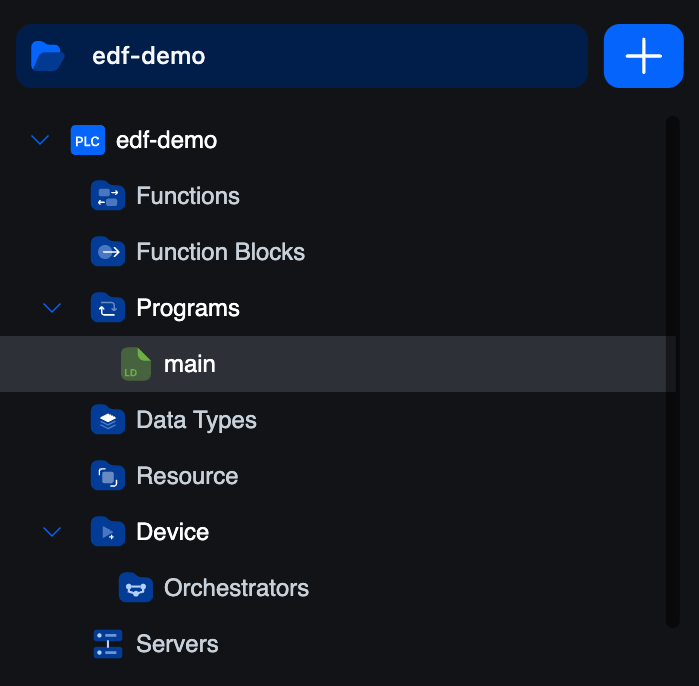
The project tree is the top half of the editor's side panel. It lists every artefact in your project, grouped by kind.
Header
The project name sits in a blue bar at the top. To the right, a + button opens the Create Element popover.
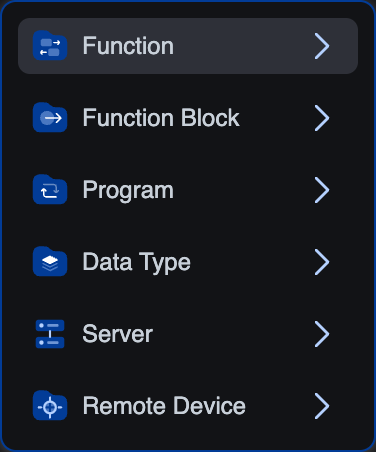
From it you can create:
function: a stateless POU that returns a valuefunction-block: a stateful POU you can instantiateprogram: a top-level POU bound to a taskdata-type: array, enumeration, or structureserver: Modbus TCP, OPC-UA, or S7Commremote-device: Modbus master, EtherCAT, or other supported remote protocols
Names must use CamelCase, PascalCase, or snake_case and be at least three characters long.
Branches
Functions
Function-type POUs. A function takes inputs, computes once, returns a value, and keeps no state between calls.
Function Blocks
Function-block-type POUs. A function block can hold internal state. You declare an instance in a variable (or in the Resource editor as a global), and each instance keeps its own state. The language can be ST, LD, FBD, IL, Python, or C/C++.
Programs
Program-type POUs. A program is the entry point, it only runs when an instance in the Resource editor binds it to a task. A project usually has one or a handful of programs.
Data Types
Your user-defined types. Each one is one of:
- Array: fixed-shape collection of a base type.
- Enumeration: named symbolic values.
- Structure: named fields with their own types.
Click a type to edit its definition. Once defined, types appear in the variable table's type-picker alongside the built-in types.
Resource
A single editor with three stacked sections:
- Global variables: declared once, visible to every POU.
- Tasks: execution schedules (Cyclic with an interval, or Interrupt with a source). Each carries a priority.
- Instances: bind one program to one task. Until you have at least one instance, nothing actually runs on the vPLC.
See Tasks and Instances for the conceptual model.
Device
Lists the Edge Device and remote-device entries for this project.
- Edge Devices: opens the connection screen. From there you pick an Edge Device + a vPLC and log in. See Connecting to a vPLC.
- Below Edge Devices, any remote devices you've added live as siblings of the Edge Device entry. Each one (Modbus master, EtherCAT bus master) opens its own editor.
Servers
The communication servers running on this vPLC.
- Modbus TCP slave: expose memory to SCADA / HMIs.
- OPC-UA server: publish a typed address space.
- S7Comm server: Siemens-S7-compatible endpoint.
You add servers through the same + popover at the top of the tree, picking server and then the protocol. Each server's editor is one tab in the central area.
Working with the tree
- Click a leaf to open it as a tab.
- Right-click a POU for rename, delete, and duplicate actions.
- Drag items between branches to reorganise (where the project format allows).
- The active item is highlighted (the dark band you can see around
mainin the screenshot). - The breadcrumb above the editor area always reflects the active tree path.
Searching
The activity-bar Search opens a project-wide text search across POU names, variable names, comments, and body contents. Results render as a tree mirroring the project structure with the matched ranges highlighted, click a result to jump to it.
What's next
- Console & PLC Logs: what's at the bottom of the editor.
- Working with Variables: the table editor above every POU body.
- Connecting to a vPLC: log in to a runtime and deploy.
On This Page