Settings → Billing
The Billing section shows your personal subscription and billing history. (Organization plans are managed separately on each org's Billing tab.)
To open it, click your avatar in the top-right, choose Settings, then Billing in the left side-nav.
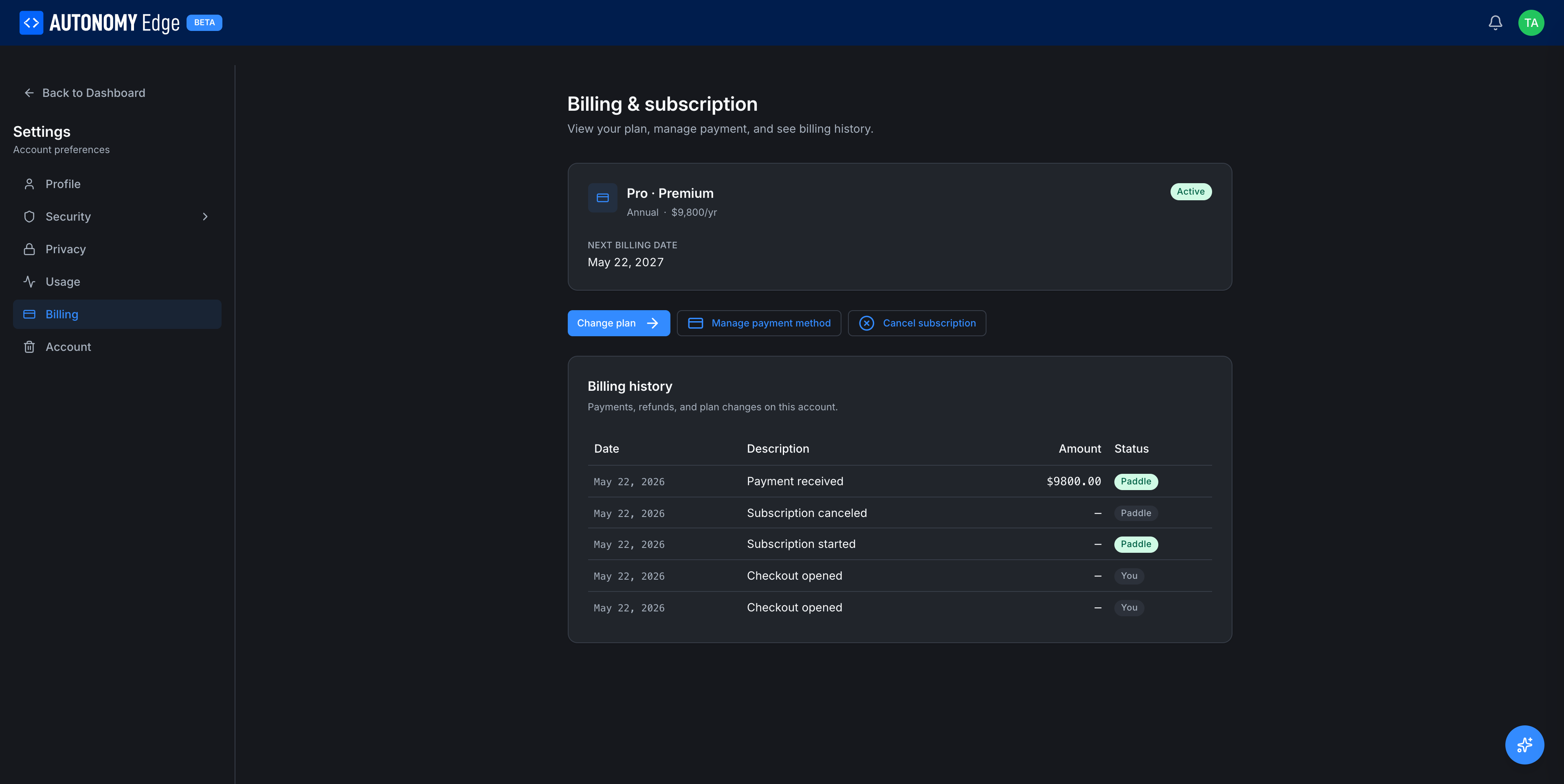
Current plan card
The top card shows the plan you're on and its key metadata:
| Field | Description |
|---|---|
| Icon + {Plan name} · {Tier} | e.g. Community · Standard, Pro · Annual. |
| Status badge | Active, Trialing, Past due, Canceled. |
| Billing cycle | Monthly or Annual. Free plans show Monthly · Free. |
| Next billing date | When your plan renews (or trial ends). Free plans show a placeholder date. |
Actions available depending on plan and status:
- Change plan: opens the pricing page to upgrade or downgrade.
- Cancel subscription: paid plans only. Cancels at the end of the current billing cycle.
- Manage payment method: paid plans only. Add, remove, or change default card.
- Update billing address: paid plans only.
Billing history
Below the current plan card, a section labeled Billing history.
For Community (free) accounts: No billing activity yet. Payments and plan changes will appear here.
For paid accounts, each row is one event:
- Date.
- Description: e.g. Pro plan annual renewal, ACU top-up 10,000, Plan downgrade to Community.
- Amount.
- Status: Paid, Refunded, Failed.
- Invoice: download icon to grab the PDF.
Payment methods
When you have a paid plan, a Payment methods section appears with:
- A list of stored cards (last 4 digits, brand, expiration).
- Default marker on one card.
- Add card action.
- Per-card actions: Set as default, Remove.
The platform uses a PCI-compliant payment processor; card numbers are never stored on Autonomy Edge's servers directly.
Personal vs organization billing
This page is for your personal plan only. Your personal plan governs:
- What you can create in your personal workspace.
- Your AI Credit Units (separate from any org's ACU pool).
- Whether you can create private projects.
Organization plans are separate:
- Each org has its own subscription, paid by the org's owners.
- An org plan does not extend your personal plan.
- Your role in an org doesn't depend on what you pay personally; it's set by the org.
See Org billing for org-level subscription management.
Trialing
Pro and Teams plans offer 14-day trials. While trialing:
- The platform behaves as if you're on the plan.
- You're not charged until the trial ends.
- A reminder email is sent 3 days before the trial expires.
- If you don't add a payment method, the plan automatically downgrades back to Community when the trial ends.
Upgrading
- Click Change plan (or visit Pricing).
- Pick the new plan and billing cycle.
- Enter payment details if you don't have one on file.
- Confirm. The new plan activates immediately; any prorated charge is added.
Downgrading
- Click Change plan.
- Pick a smaller plan.
- Confirm. The downgrade takes effect at the next billing cycle (so you keep the higher tier for what you've paid).
- After downgrade, anything that exceeds the new plan's limits is grandfathered but blocks new creations.
Canceling
Click Cancel subscription. You'll see:
- The exact date your plan ends.
- A summary of what you'll lose.
- A confirmation button.
After confirmation, the plan continues until the end of the current cycle, then drops to Community.
Where to next
- Plan comparison → Pricing.
- What gets unlocked per plan → Plan limits.
- AI credit balance → Settings → Usage.
On This Page