Your user profile
Your user profile is your public-facing page on Autonomy Edge. Everyone (including people without an account) can visit it and see your projects, your activity, and your contribution graph.
To open your own profile, click your avatar in the top-right and choose My Profile. To visit someone else's profile, click their avatar or name anywhere on the platform.
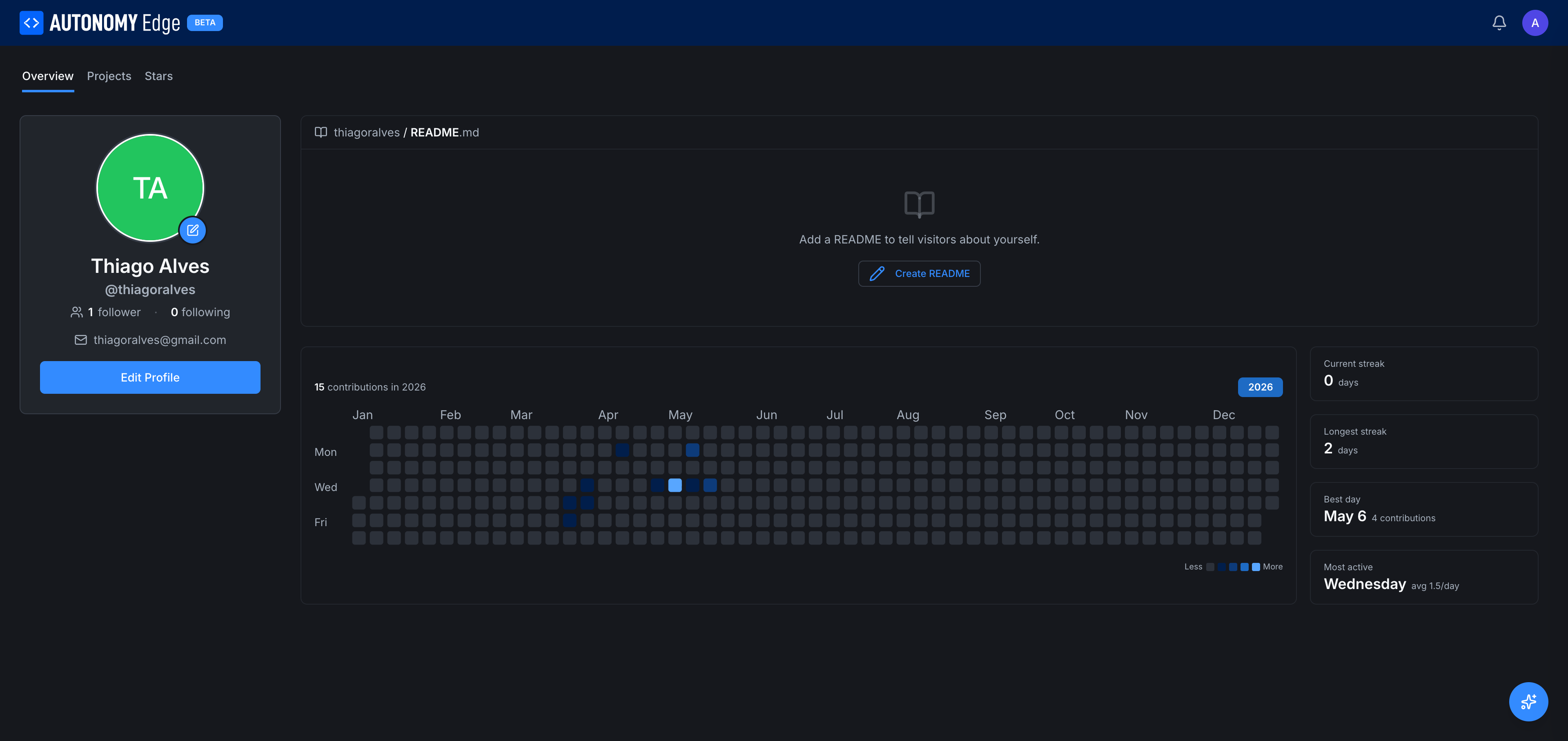
Left column, identity
- Avatar: a circle with your initials by default. Click the small pencil to upload an image. See Editing your profile.
- Display name: bold under the avatar.
- @username: your handle, also used in URLs.
- Followers / Following counts: clickable to expand the lists.
- Email: visible only on your own profile (not other people's).
- Edit Profile button: opens Settings → Profile in the same window. Visible only on your own profile.
Top, tabs
Across the top of the right side:
- Overview (default): the contribution graph and pinned README.
- Projects: your public projects (and your private ones, when viewing your own profile).
- Stars: projects you've starred.
Right column, overview
{username} / README.md: if you've added a README to your profile, it renders here. If not, you see a placeholder Add a README to tell visitors about yourself. with a Create README button. The README is a public markdown document that you can use to introduce yourself.- Contributions graph: a year-view heatmap, similar to GitHub. Each tile is one day; darker = more contributions that day. The legend at the bottom right runs from Less to More. Hover any tile for the exact count.
- Year selector: top right of the graph. Pick which year to view; defaults to the current year.
Stats panel (right of the contribution graph)
Four metrics:
- Current streak: days in a row with at least one contribution.
- Longest streak: your all-time longest run.
- Best day: the day with the most contributions.
- Most active: your most active day of the week.
These give a sense of your patterns. They're public, like everything else on the profile.
Projects tab
Lists your projects. For your own profile this includes both public and private projects (with privacy badges); for someone else's profile only their public projects appear.
Each project is shown as a card identical to those on the projects list, name, ID, last-modified, action icons.
You can star and unstar from this view.
Stars tab
Every project you've starred, in reverse chronological order. A useful "reading list" you've curated.
Activity attribution
Your profile is the canonical identity attached to:
- Commits: your name and avatar appear next to commits you authored.
- Pull requests: listed under "Created by me" everywhere, and tagged with your name in reviewers.
- Forum posts and DMs: every post and message you write.
- Organization memberships: the orgs you belong to. Visible to the public unless the org has private membership listings.
Deleting an account leaves these in place but credits them to [deleted]. See Settings → Account.
Visiting other users' profiles
When you open someone else's profile:
- The Edit Profile button is replaced by Follow / Following and (if their privacy allows) Message.
- Email and private profile data are hidden.
- Their public projects, contribution graph, and stars are visible.
Where to next
- Update your profile information → Editing your profile.
- Add a README to your profile → click Create README on the Overview tab, then write markdown in the editor that opens.
- Manage account settings → Settings overview.
- Adjust who can see what → Settings → Privacy.
On This Page