Array data types
An array is an ordered collection of elements that all share the same base type. Instead of declaring ten variables for ten temperature sensors, you define a single array type and declare one variable that holds all ten readings.
The array editor
Creating a type with Array as the derivation opens this editor:
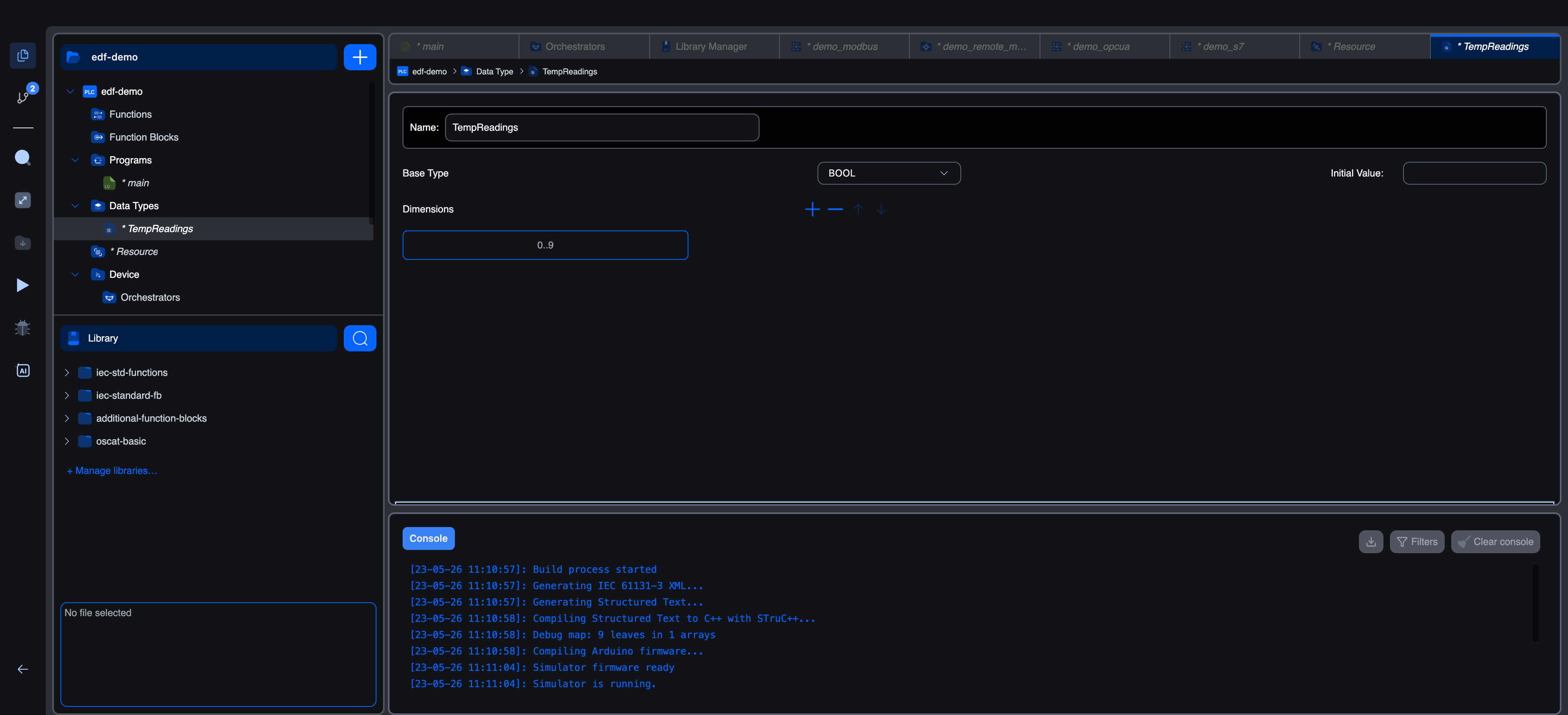
Three things to fill in:
| Field | Notes |
|---|---|
| Name | The type's identifier (set when you created it; editable here). |
| Base Type | The type of each element. Pick from base IEC types or any other user-defined type (yes, you can have an array of structures, or an array of arrays). |
| Initial Value | Optional. Cold-start value for the whole array. For simple cases, leave it blank; the elements default to their base type's zero (FALSE / 0 / 0.0). |
Below that, the Dimensions section is where the actual size lives.
Dimensions
A dimension is a range, written LOW..HIGH:
| Dimension | Element count | Indices |
|---|---|---|
0..9 | 10 | 0, 1, 2, 3, 4, 5, 6, 7, 8, 9 |
1..5 | 5 | 1, 2, 3, 4, 5 |
0..99 | 100 | 0–99 |
Click the + in the Dimensions toolbar to add a new dimension. For a multi-dimensional array, add more rows. The array's full shape is the cross-product of every dimension you list.
| Dimensions | Resulting array | Total elements |
|---|---|---|
0..9 | 1-D array of 10 elements | 10 |
0..2, 0..3 | 2-D array (3 rows × 4 columns) | 12 |
0..9, 0..9, 0..9 | 3-D array (10×10×10) | 1000 |
The IEC declaration syntax for the type, shown in code mode, looks like this:
iecTYPE
    TempReadings : ARRAY[0..9] OF REAL;
END_TYPE
Or, for a 2-D array:
iecTYPE
    RecipeTable : ARRAY[0..2, 0..3] OF INT;
END_TYPE
Picking a base type
Click Base Type to open the picker. Same categories as the variables editor:
- Base types: any IEC scalar (
BOOL,INT,REAL,TIME,STRING, …). - User data types: any other custom type you've defined, including other arrays or structures.
ARRAY[0..9] OF SensorReading is a perfectly legal type, ten copies of a structure. The same goes for ARRAY[0..9] OF SomeEnum, a fixed-size column of enum values.
Using an array in your code
Declare a variable of the array type just like any other:
iecVAR
    temperatures : TempReadings;
END_VAR
Then index into it. Both ST text and graphical block calls accept array variables; element access uses square brackets:
iec(* Read element at index 3 *)
current := temperatures[3];

(* Write element at index 0 *)
temperatures[0] := 22.5;

(* Loop over the whole array *)
FOR i := 0 TO 9 DO
    temperatures[i] := 0.0;
END_FOR;
For multi-dimensional arrays, separate indices with commas:
iecrecipe : RecipeTable;       (* 3 rows × 4 columns *)
recipe[1, 2] := 100;        (* row 1, column 2 *)
Initial values
To pre-fill the array, type a comma-separated list into the Initial Value field. The syntax is [v0, v1, v2, ...] with one value per element, in index order:
iecTempReadings : ARRAY[0..4] OF REAL := [20.0, 21.0, 22.0, 23.0, 24.0];
Use the repeat-count form n(v) for runs of the same value:
iecZerosAndOnes : ARRAY[0..7] OF INT := [4(0), 4(1)]; (* 0,0,0,0,1,1,1,1 *)
For multi-dimensional arrays, the initial value is a comma-separated list of all elements in row-major order:
iecTwoByTwo : ARRAY[0..1, 0..1] OF INT := [1, 2, 3, 4]; (* [0,0]=1, [0,1]=2, [1,0]=3, [1,1]=4 *)
Bounds-checking
In this build, array accesses are not bounds-checked at runtime. Indexing past the declared range is undefined behaviour (typically reads/writes adjacent memory, sometimes wraps around, depending on the compiler). Use ST IF guards or careful loop bounds to keep accesses inside the declared range.
What's next
- Enumerated data types: for fixed sets of named values.
- Structure data types: for grouped fields of mixed types.
- Using custom types in code: declaring variables of custom types, accessing fields and elements.
On This Page