Structure data types
A structure is a composite type that groups multiple named fields, each of its own type, under one type name. Where an array gives you "10 of the same thing", a structure gives you "a record with these named pieces".
The structure editor
Creating a type with Structure as the derivation opens this editor:
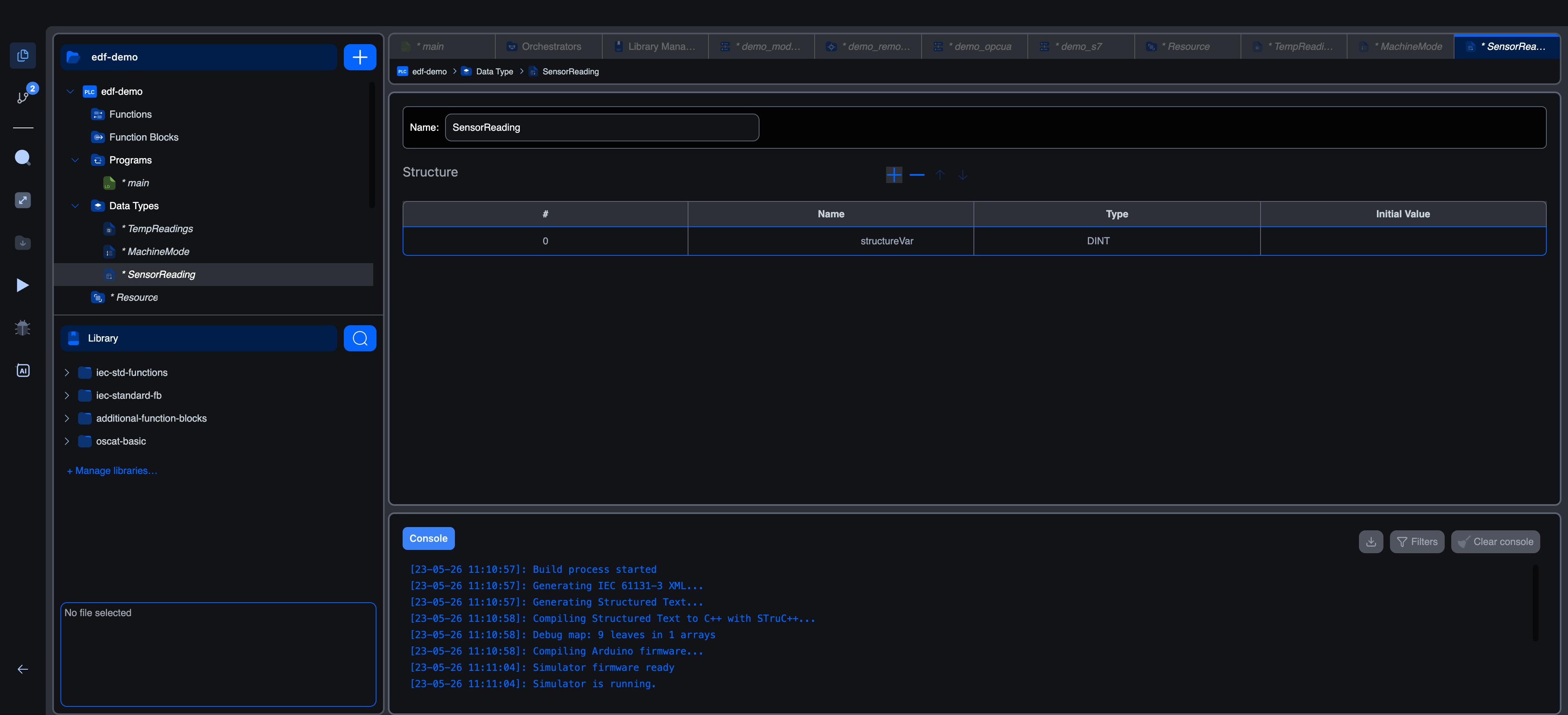
The editor has:
- Name at the top.
- A Structure section listing each field as a row with
#, Name, Type, and Initial Value columns. + − ↑ ↓controls for adding, removing, and reordering fields.
Add a row, give the field a name, pick its type, optionally set an initial value, and repeat for each field. A typical "sensor reading" structure might end up looking like:
| # | Name | Type | Initial Value |
|---|---|---|---|
| 0 | value | REAL | 0.0 |
| 1 | valid | BOOL | FALSE |
| 2 | timestamp | DATE_AND_TIME | |
| 3 | range_high | REAL | 100.0 |
| 4 | range_low | REAL | 0.0 |
The IEC text equivalent, shown in code mode:
iecTYPE
    SensorReading : STRUCT
        value : REAL := 0.0;
        valid : BOOL := FALSE;
        timestamp : DATE_AND_TIME;
        range_high : REAL := 100.0;
        range_low : REAL := 0.0;
    END_STRUCT;
END_TYPE
Field types
The Type picker on each row offers the same categories as anywhere else in the editor:
- Base types: IEC scalars.
- User data types: any other structure, enumeration, or array you've defined.
That last bullet is the most useful: structures can contain other structures, arrays of structures, and any nesting you want. Common patterns:
| Outer type | Inner type | When to use |
|---|---|---|
Recipe : STRUCT temp : REAL; time : TIME; steps : ARRAY[0..9] OF Step; END_STRUCT; | Step is another struct | Recipe with a fixed-size list of step records |
Sensors : STRUCT temp : SensorReading; pressure : SensorReading; END_STRUCT; | SensorReading (struct) reused | Named bundle of sensor records |
History : ARRAY[0..99] OF SensorReading; | array of struct | Time-series buffer |
You can mix and match freely. The runtime allocates the storage exactly as declared.
Using a structure in your code
Declare a variable of the structure type:
iecVAR
    temp_sensor : SensorReading;
    pressure_sensor : SensorReading;
END_VAR
Access fields with dot notation:
iectemp_sensor.value := raw_input * 0.01;
temp_sensor.valid := TRUE;

IF temp_sensor.valid AND temp_sensor.value > temp_sensor.range_high THEN
    over_temperature := TRUE;
END_IF;
Pass whole structures into function blocks via the In Out class to mutate them in place, or Input to pass a copy:
iecmy_fb(reading := temp_sensor);   (* Input: caller passes a copy *)
update_fb(reading := temp_sensor); (* In Out: function block can write back into temp_sensor *)
Initial values
Per-field initial values live in the Initial Value column. The structure type doesn't have a single "structure-level" initial value; each variable declared of the structure picks up the per-field defaults unless overridden at declaration:
iecVAR
    temp_sensor : SensorReading := (value := 25.0, valid := TRUE);
    (* unspecified fields use their per-field defaults *)
END_VAR
When to use a structure vs an array
| You want | Reach for |
|---|---|
| 10 of the same thing, indexed by number | Array |
| A record with a fixed set of named pieces | Structure |
| A bunch of records of the same shape | Array of Structure |
| A record where some pieces are themselves indexed collections | Structure with Array fields |
If your fields' names start to feel arbitrary (item1, item2, item3), it's probably an array. If your indices start to feel meaningful (temperatures[TEMP], temperatures[PRESSURE]), it's probably a structure.
What's next
- Array data types: for ordered collections of the same type.
- Enumerated data types: for fixed sets of named values.
- Using custom types in code: declaring variables of custom types, accessing fields, looping arrays.
On This Page