Global variables
Most non-trivial projects have data that more than one POU needs to see: an emergency-stop flag, a machine mode, a setpoint everyone reads, a counter several routines update. IEC 61131-3 handles this with global variables. A global is declared once at the Resource level and any POU in the project can read or write it through an External declaration.
There is a second way to share data project-wide: a Global Variable List, a named group of globals whose members are reached as
List.memberwith nothing to declare in the POU. It is the object CODESYS calls a GVL. This page covers Resource globals, which remain the right choice for a variable that needs a physicalLocation, a retention flag, or exposure to a communication server. The comparison table sets the two side by side.
Where globals live
Globals live in the Resource editor, not inside any POU's variable table. To open it, click Resource in the project tree:
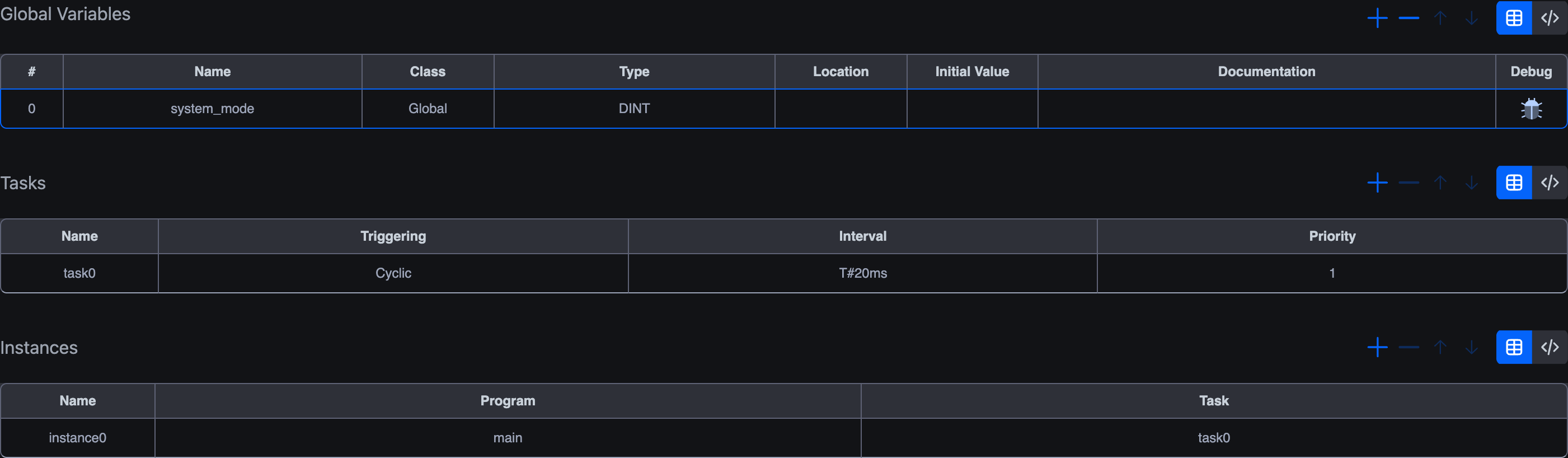
The Resource is divided into three sections, each its own table:
| Section | Purpose |
|---|---|
| Global Variables | Variables shared project-wide (this page). |
| Tasks | Execution schedules (cyclic with an interval, or interrupt-driven). |
| Instances | Bind a Program POU to a Task so it actually runs. |
A Global variable is just a row in the Global Variables table. The Class column is fixed to Global and can't be changed. Every other column (#, Name, Type, Location, Initial Value, Documentation, Debug) works exactly the same as in the per-POU variables editor, including the table/code-mode toggle and the alias mechanism. The walk-through below focuses on what's specific to globals.
Declaring a global
In the Global Variables table at the top of the Resource editor:
- Click the
+in the top-right of that section. - A new row is added with class
Global. Fill in Name, Type, and optionally Initial Value. - Click the Name cell to rename, the Type cell to pick a type.
In IEC text form, globals live inside a VAR_GLOBAL block:
iecVAR_GLOBAL
    system_mode : INT := 0;
    emergency_stop : BOOL := FALSE;
    target_temperature : REAL := 22.5;
    production_count : DINT := 0;
END_VAR
A global can optionally have a Location (%IX0.0, %MW3, etc.). The most common reason to set one is to make the variable visible to a communication server. Modbus / OPC-UA / S7Comm all expose the IEC memory image to external clients, and the location tells the server which slot of that image the variable occupies. Globals without a location are pure in-memory data, fine for sharing project-wide state.
Reading a global from a POU, External
A global is not automatically visible inside POUs. Each POU that needs to access it declares an External variable with the same name and the same type:
iecVAR_EXTERNAL
    system_mode : INT;
END_VAR
The External declaration doesn't create a new variable. It's a reference. Inside the POU, you read and write system_mode like any local variable; changes are immediately reflected in the global, and any other POU with a matching External sees the new value on the next scan.
A worked example. In the Resource:
| Name | Class | Type | Initial Value |
|---|---|---|---|
system_mode | Global | INT | 0 |
emergency_stop | Global | BOOL | FALSE |
In a program POU:
| Name | Class | Type |
|---|---|---|
system_mode | External | INT |
emergency_stop | External | BOOL |
local_counter | Local | INT |
The program can then use all three together:
iecIF NOT emergency_stop AND system_mode = 1 THEN
    local_counter := local_counter + 1;
END_IF;
local_counter is private to this POU. system_mode and emergency_stop are project-wide; any other POU that declares matching Externals reads the same values.
Name / type rules
- The External's name must match the Global exactly (case-insensitive in IEC).
- The types must match exactly. An External declared as
REALagainst a Global ofINTis a type mismatch and fails on the next compile. - The External itself doesn't carry an Initial Value, initial values live on the Global, since there is only one underlying value.
Typical patterns
A clean way to organise globals is to group them by purpose. The two main categories you'll see in practice are physical I/O (variables with a Location) and shared data (variables without one).
Physical I/O
Globals with a Location like %IX0.0 or %QX0.0 map directly to physical input or output pins on the runtime. Centralising them in the Resource means each POU references them through External declarations and never has to think about wiring; if the wiring changes you only update one place.
| Name | Class | Type | Location | Initial Value | Documentation |
|---|---|---|---|---|---|
start_btn | Global | BOOL | %IX0.0 | FALSE | Start pushbutton, NO contact |
stop_btn | Global | BOOL | %IX0.1 | FALSE | Stop pushbutton, NC contact |
e_stop | Global | BOOL | %IX0.2 | FALSE | Emergency stop, NC contact |
motor_fwd | Global | BOOL | %QX0.0 | FALSE | Motor forward contactor |
motor_rev | Global | BOOL | %QX0.1 | FALSE | Motor reverse contactor |
speed_ref | Global | INT | %QW0 | 0 | VFD speed reference, 0–10000 |
temp_sensor | Global | INT | %IW0 | 0 | PT100 temperature, raw ADC |
This isn't required, a Program can just as easily declare its own Local-class variables with Location set, and most small projects do. The case for centralising in the Resource is shared visibility.
Shared data
Globals without a Location are pure in-memory shared state. The runtime allocates storage for them; no physical pin involved.
| Name | Class | Type | Location | Initial Value | Documentation |
|---|---|---|---|---|---|
system_mode | Global | INT | 0 | 0 = Off, 1 = Manual, 2 = Auto | |
batch_count | Global | DINT | 0 | Total parts produced | |
alarm_code | Global | INT | 0 | Active alarm number; 0 = none | |
recipe_id | Global | INT | 1 | Currently loaded recipe |
Mixed
Most real projects combine both. The code-mode view groups them inside a single VAR_GLOBAL block; comments help separate the groups:
iecVAR_GLOBAL
    (* Physical Inputs *)
    start_btn AT %IX0.0 : BOOL := FALSE;
    stop_btn  AT %IX0.1 : BOOL := FALSE;
    temp_sensor AT %IW0 : INT  := 0;

    (* Physical Outputs *)
    motor_run AT %QX0.0 : BOOL := FALSE;
    heater    AT %QX0.1 : BOOL := FALSE;
    speed_ref AT %QW0   : INT  := 0;

    (* Shared Data *)
    system_mode    : INT  := 0;
    target_temp    : REAL := 25.0;
    alarm_active   : BOOL := FALSE;
END_VAR
Note the AT %IX... / AT %QX... notation in code mode. This is the IEC syntax for declaring a variable with a Location, and it's legal in VAR (Local) and VAR_GLOBAL blocks. It's not legal in VAR_INPUT / VAR_OUTPUT blocks, which is why physical I/O lives in Local or Global declarations, never in an FB's interface.
When (and when not) to use globals
Globals are the right answer when something is shared state that needs to be visible across multiple POUs:
- Machine-wide modes (
system_mode= AUTO / MANUAL / IDLE). - Safety / fault flags (
emergency_stop,over_temperature). - Setpoints an operator changes from one POU but several other POUs read.
- Counters and totals that aggregate across the project.
Globals are not the right answer for:
- Physical I/O that only one POU touches. A variable bound to
%IX0.0lives in the POU that reads it as aLocalwith aLocation, no global needed. Globals are for in-program data sharing, not for input/output pin mapping. - Function-block interfaces. Don't expose an FB's inputs and outputs as globals. Declare them with
InputandOutputclasses on the FB itself. Globals are noisier and harder to reason about than explicit interface pins. - Anything one POU could keep to itself. Every global is one more thing every reader has to know about. Reach for
Externaldeliberately, not as a convenience.
Communication servers and globals
Modbus / OPC-UA / S7Comm servers expose the IEC memory image to external clients. For a global to be reachable through one of those servers, give it a Location in the appropriate memory area:
%QX/%QW/%MDetc. for variables the server should make writable (Modbus holding registers, OPC-UA writable nodes).%IX/%IWfor read-only inputs the server publishes.%MX/%MW/%MD/%MLfor variables that aren't tied to physical I/O but live in shared memory the server can map.
The mapping rules are protocol-specific. See Modbus server and OPC-UA address space for the details.
Caution before deleting
A Global referenced by an External in any POU will produce a compile error on the next build if you remove it. Before deleting, check whether any POU references it, either by searching the project (the activity-bar Search action) or by looking for External rows with the matching name in your POU variable tables.
Globals and the Tasks / Instances sections
The Resource has two more sections below Global Variables: Tasks and Instances. These describe the execution schedule of your project, not its data.
- Tasks define when programs run (cyclic every
T#20ms, etc.) and with what priority. - Instances bind a specific Program POU to a Task: so e.g.
instance0runs themainprogram insidetask0.
You won't ever bind a global to a Task or Instance. Globals are project-wide and exist independently of the schedule. The reason these three sections share the Resource editor is that they're all the "outside of any POU" parts of the IEC project: globals, schedules, and the binding between programs and schedules.
See Tasks and instances for the conceptual model.
What's next
- Global Variable Lists: named groups of globals reached as
List.member, the CODESYS-style alternative to the Resource table. - Variables editor: the full reference for the per-POU table that also applies to the Globals section.
- Tasks and instances: the other two Resource sections.
- Modbus server: how the Globals'
Locationaddresses get exposed to external Modbus clients.
On This Page