Orchestrator not connecting
Symptoms:
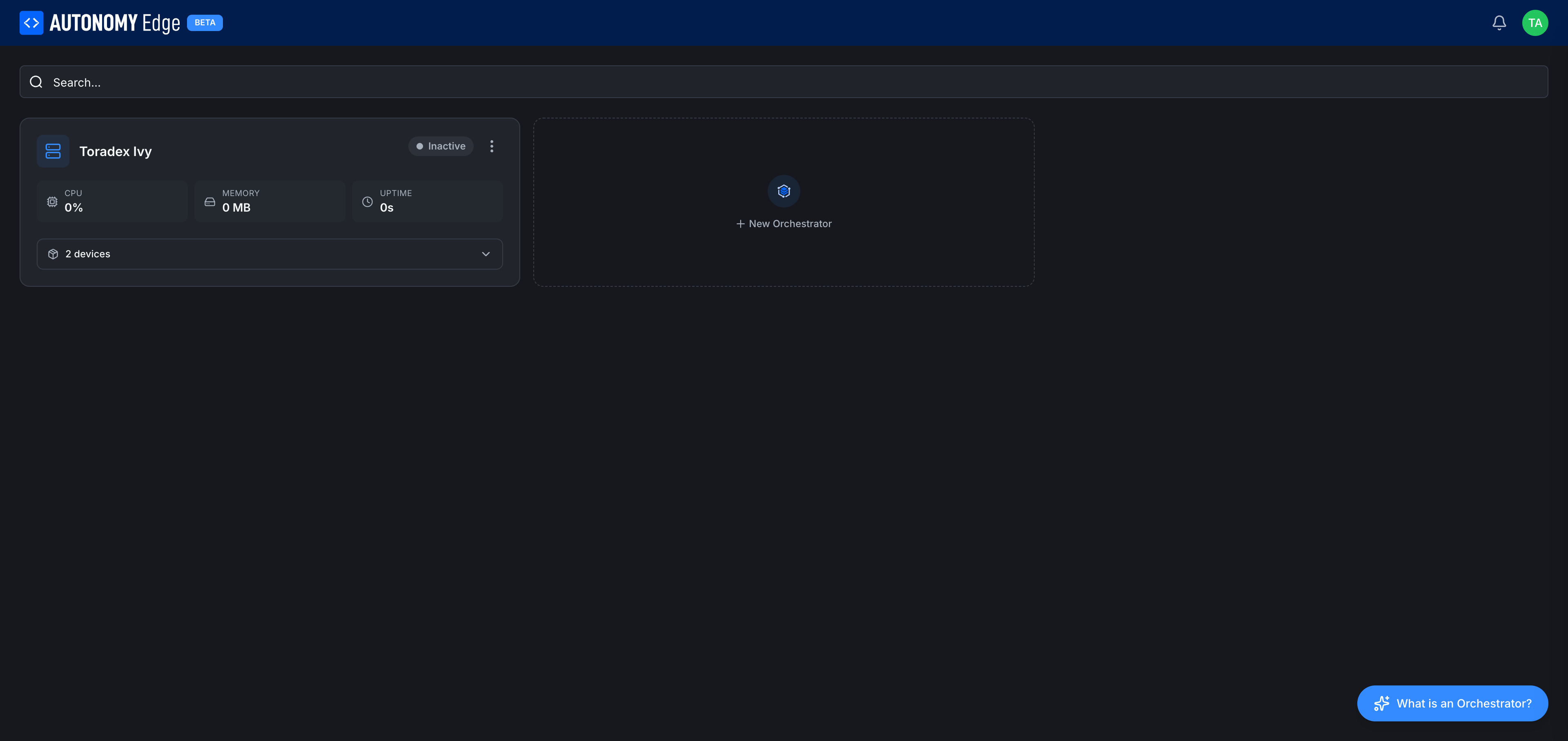
- The orchestrator card shows Inactive indefinitely.
- CPU / Memory / Uptime fields are blank or
-. - You just ran the install command but the wizard's Create Orchestrator button never finds the agent.
Work through the checks below in order, the most common causes are at the top.
1. Did the install command finish?
Re-check the terminal on the edge device. The installer should have ended with a banner showing the Orchestrator ID. If it didn't, the install crashed mid-way.
Common install-time failures:
- Docker not installed: the installer offers to install Docker on supported distributions. If you skipped that, install it manually:
curl -fsSL https://get.docker.com | sh. - Permission denied: run with
sudoor as root. - Kernel module missing: MACVLAN requires the
macvlankernel module. Check withlsmod | grep macvlan. If absent:sudo modprobe macvlan. - Network unreachable: the installer downloads the agent container from
ghcr.io/autonomy-logic/orchestrator-agent. Confirm withdocker pull hello-worldto test general Docker network reachability.
Once the install finishes cleanly and prints an Orchestrator ID, return to the wizard and paste it.
2. Did the Orchestrator ID expire?
The ID generated by the wizard expires after 5 minutes. If the install took longer, the ID is now stale.
Fix: re-run curl https://getedge.me | bash on the device. It prints a fresh ID. Paste it into a new wizard (close any expired one, open a new one).
3. Can the agent reach the cloud?
The agent maintains an outbound WebSocket to edge.autonomylogic.com on TCP 443. Things that can block it:
- Corporate firewall: outbound 443 to
edge.autonomylogic.commust be allowed. - Outgoing proxy required: set
HTTP_PROXYandHTTPS_PROXYenv vars when starting the agent. Refer to the agent's docs for proxy configuration. - DNS: verify with
getent hosts edge.autonomylogic.comon the device. If it fails, check/etc/resolv.conf.
Test reachability:
bashcurl -v https://edge.autonomylogic.com 2>&1 | head -20
You should see a successful TLS handshake (200 OK or 404 from the API root is fine, both prove network reachability).
4. Is the agent container running?
On the device:
bashdocker ps | grep orchestrator-agent
If the container isn't listed, start it:
bashdocker start orchestrator-agent
If start fails, look at the logs:
bashdocker logs --tail 100 orchestrator-agent
Common log entries to look for:
ConnectionRefusedError: cloud is blocked or unreachable.Certificate validation failed: the device's clock is wrong. Runntpdate -u pool.ntp.orgortimedatectl set-ntp true.Unauthorized: the orchestrator was deleted in the cloud. Re-pair from the wizard, or runcurl https://getedge.me | bashto regenerate.
5. Did somebody delete the orchestrator in the cloud?
If the agent's persistent ID was deleted from the web app, the agent connects but the cloud rejects it. The agent's logs show "Unauthorized" or "Unknown orchestrator".
Fix: create a new orchestrator in the wizard. Run the install command on the device again to get a fresh ID and pair the new orchestrator.
6. Network changed?
If the device moved networks (different LAN, new ISP), the agent's network-monitor sidecar should auto-detect and reconfigure. If that doesn't happen, restart the agent:
bashdocker restart orchestrator-agent
Wait 30 seconds, then refresh the web app.
7. Time skew
mTLS is very sensitive to clock drift. Confirm:
bashdate
If the time is off by more than a couple of minutes from the actual time, the TLS handshake fails. Sync:
bashsudo timedatectl set-ntp true
8. Still stuck?
- Run
docker logs orchestrator-agentand copy the last 100 lines. - Post a thread in the OpenPLC forum under Bug Reports or General Discussion, with:
- Distro and kernel (
uname -a). - Docker version (
docker --version). - The relevant agent logs (redact anything sensitive).
- Distro and kernel (
- Or contact platform support via the Feedback action in the user menu.
Where to next
- Install or re-install the agent → Installing the agent.
- Manage orchestrators in the cloud → Managing orchestrators.
- vPLC stuck after orchestrator becomes Active → vPLC stuck in Stopped.
On This Page